What is G02 vs G03? Understanding Circular Interpolation in G-code

What is G02 vs G03? Understanding Circular Interpolation in G-code
When programming CNC machines, two of the most essential G-code commands for creating curves and arcs are G02 and G03. These commands enable a machine tool to move in a circular path — a critical part of machining complex parts with precision.
In this article, we’ll break down the difference between G02 and G03, how they work, when to use each, and best practices for circular interpolation in CNC programming.
🔁 What is G02 in G-code?
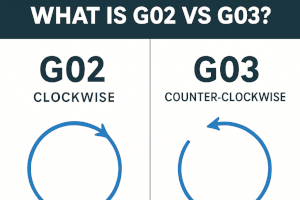
G02 stands for clockwise circular interpolation. When this command is used, the CNC machine moves the cutting tool in a clockwise arc from the current position to the specified endpoint.
✅ Example:
G02 X50 Y50 R25This command tells the tool to:
- Move in a clockwise arc
- End at coordinates (X50, Y50)
- Use a radius of 25 units to define the curve
🔁 What is G03 in G-code?
G03 is the counterpart to G02 and stands for counter-clockwise circular interpolation. It instructs the machine to move in a counter-clockwise arc to the defined endpoint.
✅ Example:
G03 X50 Y50 R25This command performs the same type of move as G02 but in the opposite direction — counter-clockwise.
🧠 G02 vs G03: Key Differences
| Feature | G02 | G03 |
|---|---|---|
| Direction of Motion | Clockwise (CW) | Counter-Clockwise (CCW) |
| Use Case | Contouring, finishing curves | Same, but for opposite direction |
| Tool Path | Arcs rightward or downward | Arcs leftward or upward |
⚙️ Two Ways to Define Arcs: R vs IJK
You can define the arc’s shape using two different methods in both G02 and G03:
1. R Format (Radius)
G02 X50 Y50 R25- Defines the radius of the arc.
- Simpler, but ambiguous for arcs greater than 180°.
2. IJK Format (Center Offsets)
G03 X50 Y50 I10 J0- I, J, and K specify the offset from the starting point to the center of the arc.
- More precise and recommended for full circles or arcs >180°.
📌 When to Use G02 vs G03
- Use G02 when your desired toolpath curves clockwise.
- Use G03 when the path curves counter-clockwise.
- Choose IJK format for complex paths or full circles.
- Use R format for quick and simple arcs under 180°.
🛠️ Best Practices
- Simulate First: Always run a simulation or dry-run to verify the arc direction.
- Understand Quadrants: G02 and G03 behavior may vary based on the quadrant system of your CNC controller.
- Avoid Ambiguity: If your arc crosses 180°, prefer IJK over R to prevent misinterpretation by the controller.
- Consistent Units: Ensure your G20 (inches) or G21 (millimeters) match the units of your arc dimensions.
🤔 Why Do G02 and G03 Matter?
Circular interpolation reduces machining time and improves part finish by smoothly navigating curves, contours, or circular holes. Without G02 and G03, you'd be forced to approximate curves using multiple small linear (G01) segments — far less efficient and accurate.
Conclusion
Understanding G02 (clockwise) and G03 (counter-clockwise) is essential for precise arc and circle programming in CNC machining. Whether you're cutting a pocket, finishing a contour, or drilling a circular feature, mastering circular interpolation allows you to deliver high-precision parts with optimal efficiency.
Related Searches:
- How to program a full circle in G-code
- What is the difference between G01 and G02?
- IJK vs R in CNC programming
- How to fix arc errors in G02/G03